How to Analyse Any Stock Using Gemini AI: Complete Guide

Imagine having access to a world-class financial analyst 24/7 — completely free. With Google Gemini AI, this is now a reality. In this post, I’ll show you how to properly configure Gemini and which prompts to use so you can perform a professional stock analysis of any publicly traded company in just a few minutes.
Why is Gemini AI suitable for stock analysis?
When choosing an AI assistant, I focused on several key criteria: it must be able to browse the internet in real time, read financial statements, gather news, and solve complex multi-step problems. It also has to be free to use — after all, every saved penny brings you closer to financial freedom.
After evaluating all criteria, Gemini proved to be one of the most user-friendly AI tools. When properly configured, Gemini can gather the latest company financial metrics, income statements, analyst forecasts, macroeconomic context, and then synthesize everything into a structured investment report.
Step 1: Proper Gemini configuration — this is critical
The quality of the output depends almost entirely on whether you enable the correct settings before submitting your prompt. Here’s what you need to do and why each setting matters.
1.1 Enable “Thinking” mode
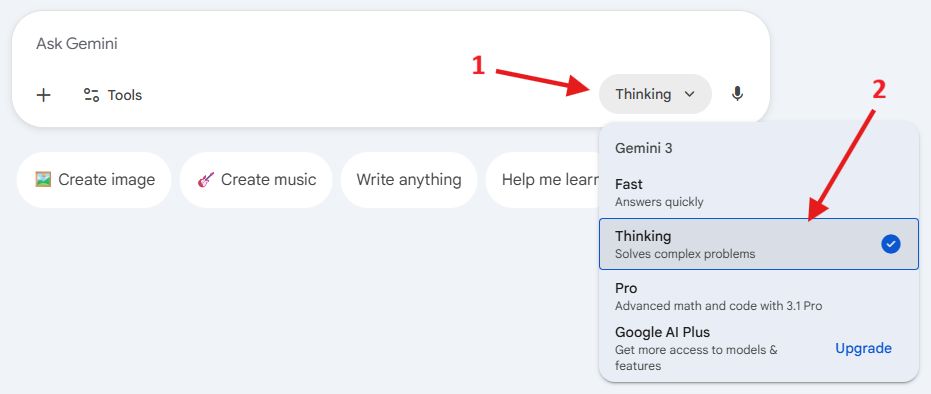
Thinking mode instructs Gemini to reason through the problem before delivering the final answer — similar to how a human analyst evaluates all collected data before writing a report.
To enable it, select “Thinking” from the dropdown menu on the right side of the prompt field.
1.2 Enable “Deep Research” mode
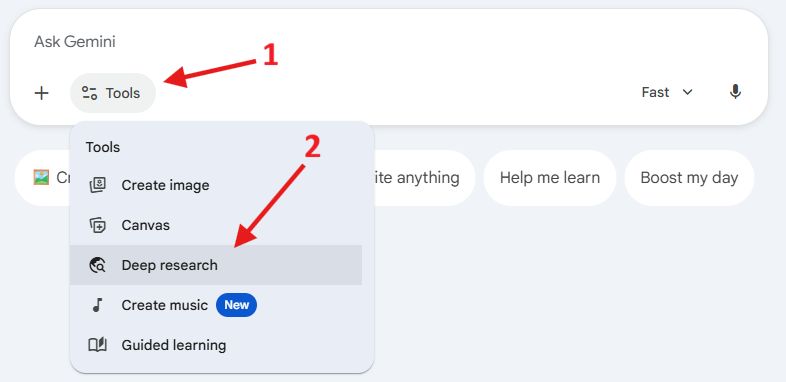
This is the most important setting for stock analysis. Deep Research turns Gemini into an autonomous research agent: instead of relying on potentially outdated training data, it performs dozens of real-time web searches, finds the latest information, and synthesizes it into a coherent report.
To enable “Deep Research” mode, click the small “Tools” icon before submitting your prompt and select “Deep Research.”
Keep in mind that in “Deep Research” mode, generating a response may take a few minutes — so be patient. Without it, Gemini relies only on its training data, which may be several months old and completely unacceptable for making investment decisions.
Step 2: The prompt — copy, paste, customize
Below is a tested prompt template. Replace the text in [brackets] with your target company’s details:
Act as a senior equity research analyst at a top-tier investment bank. Your task is to produce a comprehensive, data-driven investment research report on [COMPANY NAME] (ticker: [TICKER], exchange: [e.g. NASDAQ]).

Structure the report in the following sections:

1. **Company Overview**
   - Business model, products/services, and revenue segments
   - Key markets and geographies
   - Competitive positioning and moat analysis (brand, network effects, cost advantages, switching costs)

2. **Recent Financial Performance**
   - Last 4 quarters of revenue, gross margin, operating income, net income, EPS (use actual reported figures)
   - Free cash flow trend
   - Balance sheet health: debt/equity ratio, cash position, interest coverage

3. **Growth Drivers & Risks**
   - Top 3 growth catalysts for the next 12-24 months
   - Top 3 key risks (regulatory, competitive, macro, execution)

4. **Valuation**
   - Current Price-to-Earnings (P/E), Forward P/E, EV/EBITDA, Price-to-Free-Cash-Flow
   - Comparison against the 5-year historical average and against 3 direct competitors
   - A simple DCF scenario: base case (consensus growth), bull case (+20% to consensus), bear case (-20% to consensus)
   - Implied fair value range and current margin of safety (or premium)

5. **Analyst Consensus & Price Targets**
   - Current analyst buy/hold/sell split
   - Average, high, and low 12-month price targets
   - Any recent significant upgrades or downgrades

6. **ESG & Governance Highlights** (brief)

7. **Investment Recommendation**
   - Clear rating: Strong Buy / Buy / Hold / Sell / Strong Sell
   - Specific 12-month price target with reasoning
   - Entry point suggestion: ideal buy zone considering current technicals and valuation

Use only verifiable, up-to-date data. Cite your sources inline. Flag any figures that could not be confirmed from primary sources.
Tips for getting the best results
- Always include the ticker symbol. Many companies have similar names — the ticker removes ambiguity.
- Specify a time horizon. “12-month price targets” provides a clear investment timeframe. You can adjust this to 6 months or 3 years depending on your strategy.
- Add personal context (optional). For example: "I am a long-term dividend investor with moderate risk tolerance. Weight dividend sustainability and balance sheet quality higher than short-term earnings momentum." Gemini will adjust its analysis accordingly.
- Ask for a second opinion. After receiving the report, send a follow-up prompt: "Now give me the bear case in detail. What would need to go wrong for this stock to fall 30%?"
Step 3: Interpreting the results
Financial performance
Focus on three things: acceleration or deceleration of revenue growth, margin expansion or contraction, and free cash flow conversion. A company can show strong revenue growth but terrible cash flow — that's a red flag. Conversely, stable revenue with expanding margins and strong free cash flow is typically a quality signal.
Investment recommendation
Treat Gemini’s report as an additional insight, not a buy or sell recommendation. Cross-check the data with official company reports, financial statements, and at least a couple of independent analyses. If everything aligns, you can feel more confident in your decision.
Important disclaimers — read before investing
- AI is not infallible. Gemini can “hallucinate,” especially when analyzing small-cap companies with limited available online data. Always verify key figures using official filings such as SEC EDGAR (for U.S. companies) or the company’s website.
- This is not financial advice. Gemini-generated reports are research tools, not personalized investment recommendations. Your personal circumstances — risk tolerance, tax situation, existing portfolio — are factors AI cannot fully evaluate.
- Markets can be irrational. Even well-valued stocks can remain mispriced for years due to sentiment, macro shocks, or sector rotations. Use Gemini analysis as a supplementary input within a diversified decision-making process. It is just one piece of a big puzzle.
Summary: Gemini stock analysis checklist
- ✅ Open gemini.google.com
- ✅ Enable Deep Research mode
- ✅ Enable Thinking mode
- ✅ Paste the prompt and replace
[COMPANY NAME]and[TICKER] - ✅ Wait a few minutes for the full report
- ✅ Verify key numbers via SEC EDGAR or the company’s website
- ✅ Ask follow-up questions: bull/bear case, dividend sustainability, competitor comparison
- ✅ Make your own informed decision
Investing has never been more accessible. When used correctly, tools like Gemini AI can level the playing field between retail investors and professional fund managers. Use them wisely, stay curious, and always do your own homework by verifying the information provided..